
Looking different in two photos does not by itself mean your face has changed. Camera distance, viewpoint, lighting, and mirroring can all influence the image. A photo records you from one position at one moment; it is not a single “real face” test for every situation.
A useful way to explore the difference is to change one shooting condition at a time. Before comparing the front camera, rear camera, mirror, and an AI report as though they were equivalent, consider how each image was made.
1. Camera distance and framing affect appearance
When a phone is very close, the visible relationship between features nearer to and farther from the camera can change. That is one reason a close selfie may differ from a portrait taken farther away. Lens choice and framing also matter; “front camera wrong, rear camera right” is too simple an explanation.
Nikon's portrait photography guide explains how lens choices can affect a face in a photograph. Start by keeping distance and position similar rather than buying equipment.
2. Light reveals different details
Light from above, the side, or the front creates different shadows. A line that looks prominent in one frame can be less noticeable in another. Mixed room lighting can also make colors harder to judge. Nikon's guide discusses white balance in relation to available light.
Begin with balanced light instead of a position that puts one side in deep shadow. By a window, notice what changes when you turn. The goal is to understand the photo, not search for a higher beauty score.
3. A selfie preview may be mirrored
A mirror and a saved photo do not always have the same left-right orientation. You may also notice a difference between a phone's preview and its saved selfie. On iPhone, the front-camera mirroring setting can preserve the preview's orientation; Apple's selfie guide explains the option.
That setting changes image orientation, not the structure of your face. Check whether you are comparing the same orientation. The exact settings layout can vary with iOS version.
4. Angle, expression, and processing may differ
A phone above eye level gives a different viewpoint from a phone held below it. A smile, head turn, or hair across the face also changes the frame. Comparing a camera-app photo with one from a filtered social camera changes both the shooting conditions and the processing.
Use the same app for a comparison and check active filters. The portrait checklist covers sharpness and framing.
Try a three-photo comparison
- Take an unfiltered photo in balanced light with the phone around eye level.
- Keep light and expression similar, moving only the phone a little farther away.
- Return to the first distance and change only your position relative to the light.
Compare the frames in your gallery. Consider distance when looking at the second, and light when looking at the third. If you changed several things, you have not isolated a single cause. This is an informal way to explore photo conditions, not a biometric measurement.
Why does my nose look different in a close selfie?
Parts of a face sit at different distances from the camera. Moving the camera very close can change their apparent size relative to each other. A 2018 research letter on short-distance photographs used a mathematical model to examine this perspective effect, comparing close selfie distances with a farther portrait distance. It supports checking camera distance before interpreting a difference in the image. It does not establish one universally “true” portrait or validate an AI beauty score.
A practical comparison is to take one frame at your usual close distance, then place the phone farther away with the camera at the same height. Use a timer or another person if helpful. Keep your light and expression similar; crop a copy afterward if you want to compare similarly sized faces. Enlarging the close photo alone does not recreate the farther camera position.
Front camera or back camera: which should you trust?
Neither camera creates a complete account of how you appear in every situation. A rear-camera portrait taken farther away and a close front-camera selfie differ in more than the camera used. Compare distance, angle, processing, and orientation first. A camera switch by itself does not isolate the cause.
For an iPhone comparison, inspect the saved images rather than comparing one live preview with one saved photo. If left and right have swapped, check the front-camera mirroring setting described by Apple. Available camera options can vary by device and software.
Keep a simple comparison record
Label your three photos in your own notes: “A: usual setup,” “B: farther camera,” and “C: changed light.” Write the one condition you intended to change beside each. Look for framing, shadow, and orientation differences before attaching meaning to a feature. The exercise helps you describe how the image was made; it is not a way to calculate facial accuracy.
If the comparison is becoming frustrating, you can stop. You do not need an app report to settle which photograph is your “real” face. If you choose to explore a report, read it as an interpretation of that selected frame.
If you use the portrait for a face report
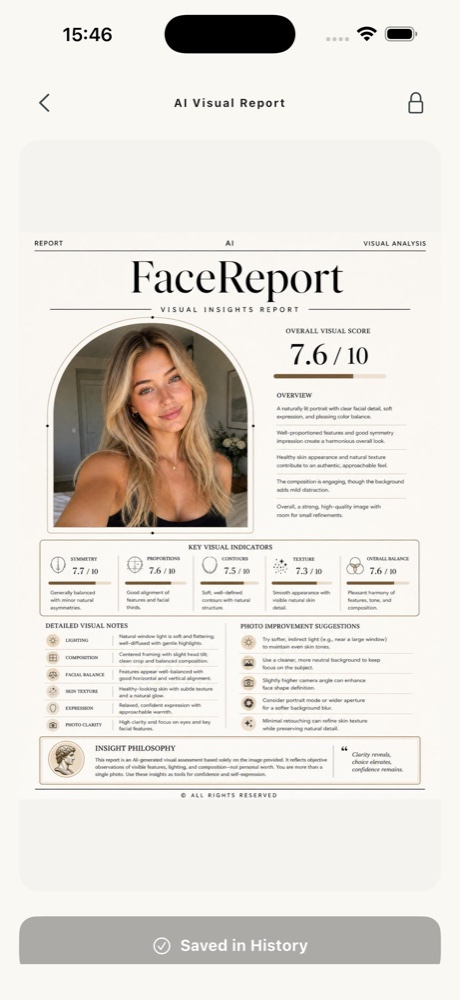
FaceReport AI also works from the visible details in the selected image. Changed interpretations under changed conditions are not evidence of a real personal change. Do not use the report as an identity, health, or personal-worth measurement. Read how to interpret a report.
If you want to explore visual details or makeup inspiration after checking the photo, view FaceReport AI on the App Store. Reports are created in the iPhone app under its current access conditions. Our AI face analysis introduction explains the scope.
INSIDE FACEREPORT AI
Photo conditions first, interpretation second
Make the photo comparison in your gallery. If you continue in the app, assess the report as an interpretation of the one frame you selected.
- Compare distance and lighting changes in your gallery.
- Choose one portrait whose shooting conditions you understand.
- Keep that context while reading; scores are not an accuracy test.
Photo selection, consent, and reports happen in the app. AI ideas may be incorrect. Access and current prices are shown in the app.
For information and inspiration. How we prepare our guides ↗ · Türkçe sürüm ↗