
AI face analysis is a broad term for software that interprets visible details in a face photo. Different apps use it to mean different things. FaceReport AI focuses on a report about the visible features and visual balance of a selected portrait. It does not determine your identity, personality, or personal worth.
Face analysis versus face recognition
Face recognition generally refers to matching a person's identity. A visual face report instead describes or comments on what appears in a portrait. The phrase “face analysis” alone does not mean an app verifies identity, makes medical assessments, or performs validated measurements. Check what data an app uses and what its output is intended to do.
What can you use a photo report for?
- Explore visible details in a portrait from a different perspective.
- Find a starting point for makeup ideas you want to adapt.
- Return to a favorite report with a name and your own notes.
For a simple everyday look, choose one idea you would like to try rather than turning every comment into a new rule about your face. Your preferences stay in charge. Our personalized makeup guide explains how to describe a useful goal.
How to get a report in FaceReport AI
- Open the iPhone app, choose a face report, and select a clear, well-lit portrait.
- Read the explanation about processing your photo and give consent if you want to continue.
- Read the completed report alongside the photo you selected.
- Save a result to favorites if you want to return to it, and add a name or note.
Reports are created in the app. This website does not upload photos or start an analysis. Access depends on the usage rights displayed in the app; check the purchase screen for current prices and any available trial. Explore FaceReport AI or view the US App Store listing.
Which photo should you start with?
Choose a photo with one person, the whole face visible, and no heavy beauty filter. Strong shadows, a very close camera, and blur change the image being interpreted. Focus on a clear photo rather than repeatedly looking for a higher score. The portrait checklist explains the setup.
What an AI face report cannot tell you
A photo-based comment is not a medical assessment or a universal beauty standard. Do not use it to infer health, personality, or future success from appearance. AI output can be incomplete, incorrect, or inconsistent. A different result under different light does not by itself show a real change in you. Read how to interpret AI face reports for context.
What should you expect to see in a report?
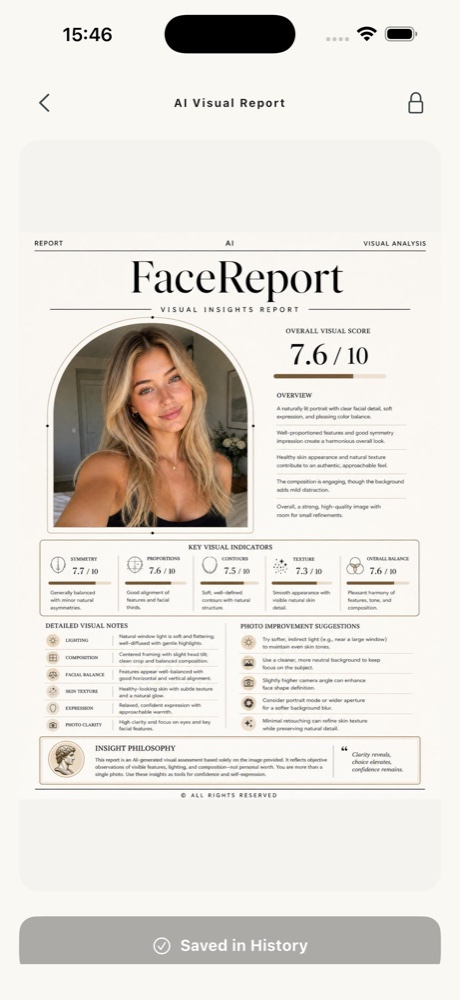
In the example below, the face report groups a portrait with a written overview, visual indicators, and photo suggestions. Read the words as well as any displayed number. A score has no useful meaning outside the method that produced it; it does not establish how other people see you.
For example, imagine that the report comments on a shadow beside one cheek. First look at that area in the original photo. Was a lamp beside the camera? Is hair covering the area? The practical next step may be to change your lighting for a portrait, rather than change anything about your face.
A useful question to bring to an AI face analysis app
Start with a task you can actually use: “Which photo details should I check before choosing a portrait?” or “What makeup color direction would I like to explore?” Those questions give you a next step. Asking an app to determine whether you are attractive turns an uncertain image interpretation into a judgment it cannot reliably provide.
If you only want to understand why a selfie looks unusual, begin with our camera distance and mirroring guide. You can compare shooting conditions in your gallery before deciding whether a generated report would be useful.
Questions to ask before choosing an app
Understand where your photo is sent, why it is processed, how report credits work, and how subscriptions are managed. A promotional example does not promise the same result for your photo. See our Privacy Policy, Terms, and editorial approach before deciding.
INSIDE FACEREPORT AI
What is inside a face report?
See how the portrait, overview, visual interpretations, and photo suggestions fit together.
- Choose a clear portrait and review the processing explanation.
- Read the overview alongside the photo you selected.
- Keep one useful idea for your next portrait.
Photo selection, consent, and reports happen in the app. AI ideas may be incorrect. Access and current prices are shown in the app.
For information and inspiration. How we prepare our guides ↗ · Türkçe sürüm ↗